Configure Your Di2 Shifters
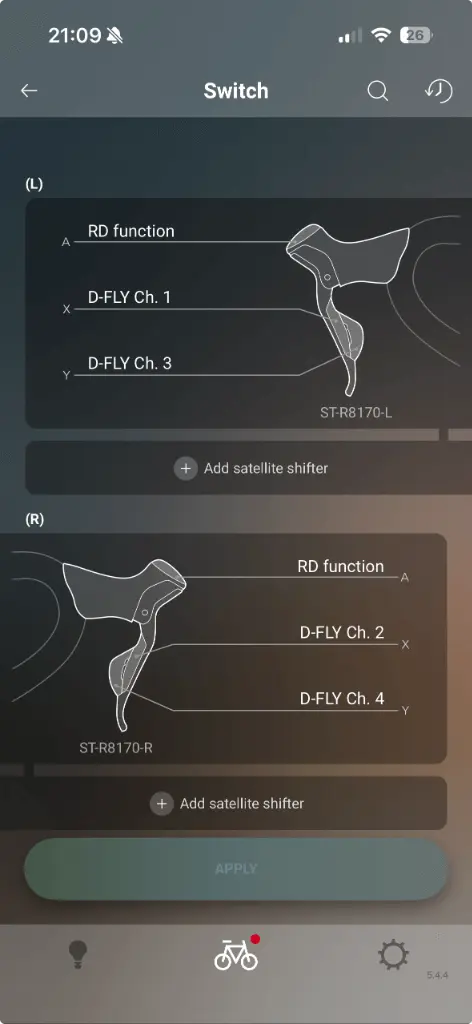
Download the Shimano E-Tube Project app on your smartphone. Connect to your Di2 system and configure the button channels on your shifters to send Bluetooth signals.
Set up VirtualShift in just a few steps and start shifting naturally in Rouvy.
Download the Shimano E-Tube Project app on your smartphone. Connect to your Di2 system and configure the button channels on your shifters to send Bluetooth signals.
Launch VirtualShift on your Mac. When prompted, accept the Bluetooth permission to allow the app to communicate with your Di2 shifters.
Follow the onboarding flow to understand how the app works.
Once your Di2 derailleur appears in the app, select it to connect. After connecting, you'll need to grant Accessibility permission in System Settings so VirtualShift can send keyboard shortcuts to Rouvy.
Open Rouvy and navigate to Settings → Virtual Shifting. Enable virtual shifting mode so Rouvy responds to gear change commands.
Keep VirtualShift running in the background while Rouvy is in focus. When you press your Di2 shifters, VirtualShift translates the signal into keyboard commands that Rouvy understands.